made a web app to test edge ai
I got curious about Gemma 4 edge models, wondered what it would take to ship local inference into the browser, and ended up building local-ai.arda.tr.

Lately I have been curious about the actual capabilities of edge AI, especially in the annoying middle ground between “tiny toy demo” and “real local inference.” I had already been playing with Gemma 4 edge models on my own machines, and they run surprisingly well on a fairly modest AMD GPU. That naturally led to a more interesting question:
what would it take to ship one of these things?
Not “run it in LM Studio on my box.” Not “wire it into my homelab.” I mean: can I put a model behind a URL and let somebody else run it locally, in their own browser, on their own hardware, without standing up a backend?
So I built local-ai.arda.tr.
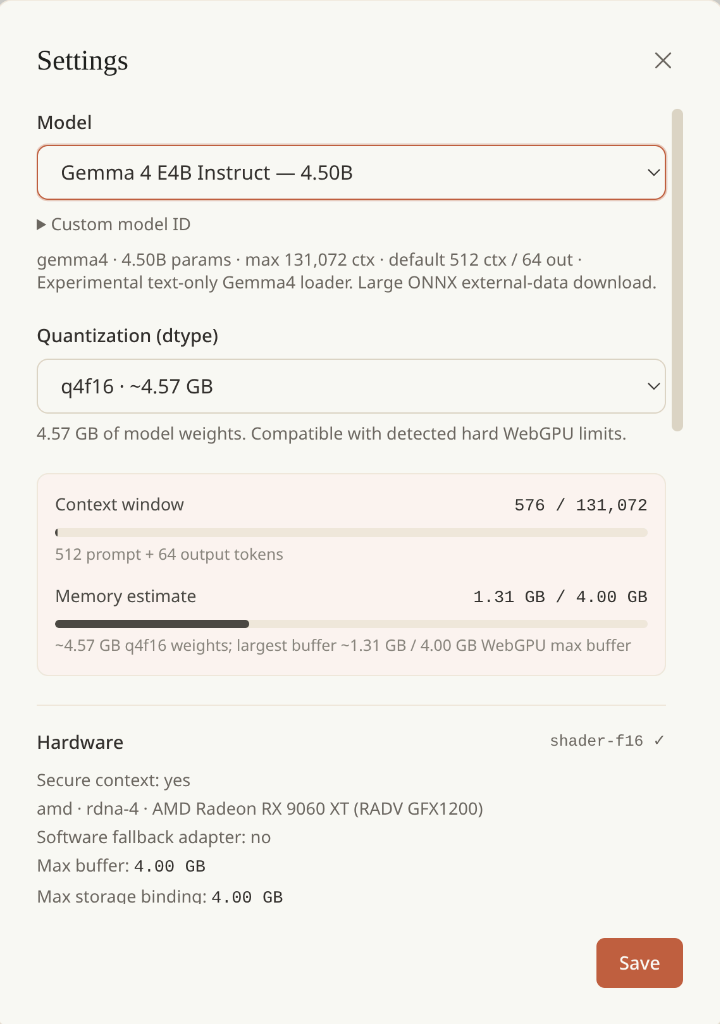
It is not an attempt to compete with LM Studio. I am not trying to reproduce every knob, provider integration, model card, tool layer, or desktop nicety. The app is intentionally bare-bones. But the basic functionality is there:
- a small hardcoded set of likely-suspect models
- context length and response length controls
- context compaction
- multiple chats
- add / delete / favorite chats
- chat export
- a basic web search tool that is, to be honest, still a bit sketchy
That is enough to answer the question I actually cared about: can a normal browser do local inference in a way that feels more like a product than a gimmick?
The answer is: yes, but with caveats sharp enough to cut your hand on.
Why I wanted to try this
This is adjacent to the local AI experiments I wrote about in Enhancing local AI with quantized KV cache and mem0, but pointed in the opposite direction.
That earlier setup was about making my own machines more capable: longer context, better memory handling, more coherent personal infra. This one was about stripping the whole thing down until it could survive as a static web app.
I keep drifting toward this kind of architecture. If I can offload the last mile to the browser and avoid a permanent runtime service, I usually will. It is the same instinct that pushed me toward moving this blog to GitHub Pages: fewer moving parts, less operational nonsense, more work done at build time or on the client.
In this case, the browser is not just rendering UI. It is the inference box.
What the app actually is
The app is a static site. There is no inference backend. No API server doing generation on my side. No hidden proxy forwarding your prompts to some cloud LLM while pretending to be local.
The model downloads into your browser. The inference happens in your browser. The chats are stored in your browser.
That part matters, because I did not open-source the repo yet.
Not because I am trying to make it mysterious. Mostly because I have not had the kind of careful look at the codebase that would make me comfortable publishing it as-is. I know how these things go: one forgotten debug branch, one embarrassing hack, one path that only made sense at 2am, and suddenly you are shipping a repo you already regret.
So it is not open-source in the usual sense right now. But it is still “open” in the practical sense that it is a static web app. The code ships to your browser. The behavior is inspectable. Everything important is happening client-side.
Which is also why I can say, with a straight face, that I am not mining BTC on your machine.
The catch
The catch is that you need to enable Unsafe WebGPU in your browser to reliably let the app access the GPU.
Which is, well, exactly as reassuring as it sounds.
I am not thrilled about asking normal people to flip a flag called Unsafe WebGPU. I promise I am not mining BTC in your browser, but still: it is probably not a great idea to leave that flag on forever just because one weird static site asked you to.
On Linux / AMD, things got even more annoying, because I also had to coax Chrome into using the right backend. There was a whole little side quest involving Vulkan, fallback adapters, SwiftShader pretending to be helpful, and the browser deciding that if I wanted proper GPU access maybe I did not deserve working YouTube video anymore.
That is one of the central lessons of this experiment:
edge AI on the web is possible, but you do not just get to “use the user’s GPU” because you asked nicely.
Browsers are cautious for good reason. GPU access is not a toy. If the path to decent browser inference starts with “please enable the unsafe flag,” you are already outside the comfort zone of mainstream software.
The nice part
Still, once it works, it works better than I expected.
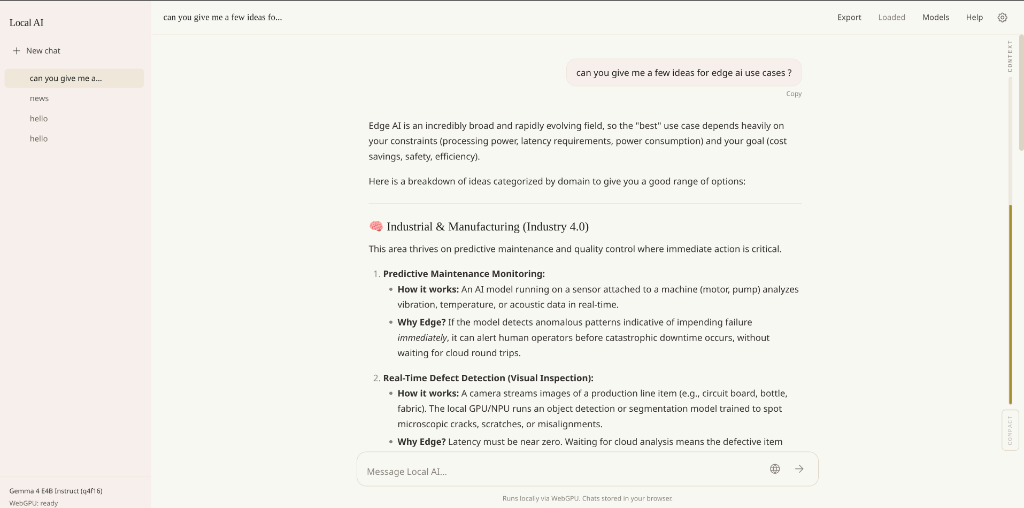
The app feels real enough. You can load a model, ask something, keep a few chats around, compact the context when it grows, export the conversation, even do a rough web-assisted answer if you want. It is enough to get a practical feel for what browser-side local AI is like without making people install LM Studio, Ollama, Open WebUI, or whatever other stack is fashionable this week.
That ease is the whole point.
If you are curious and you want to try a model in a pinch, this is much easier than telling somebody:
- install a desktop runtime
- download a few gigabytes of weights manually
- pick the right quant
- configure a chat frontend
- figure out why context length is bad
- figure out why the GPU is not being used
A URL is much nicer than a tutorial.
The limitations are very real
Is this better than running local AI directly on your own machine with proper native tools?
Probably not.
If you actually want a serious local setup, LM Studio / Ollama / Open WebUI is still the place to go. Native runtimes have more control, fewer browser constraints, saner access to hardware, and fewer moments where some innocent browser setting quietly turns your GPU into a software fallback adapter.
The browser version is narrower in a few important ways:
- the usable VRAM is lower than what the same machine can often do natively
- browser-side WebGPU limits can block models that would otherwise run fine
- feature support is inconsistent across platforms
- the “please enable unsafe things” story is bad for normal users
I tested it mainly on CachyOS and on Apple hardware. Apple was predictably less dramatic. Linux / AMD worked, but only after the usual little browser-GPU negotiation ritual.
On desktop I was effectively limited to around 4GB of WebGPU buffer headroom in Chrome once things were configured correctly. That is enough to make the experiment interesting. It is not enough to make the browser a universal local AI runtime.
I am not even sure that 4GB is a hard ceiling in principle. It may be possible to improve some of this with browser parameters or future changes in Chromium. But right now, in practice, that is the sandbox I was operating inside.
Mobile is both promising and silly
I also tried it on mobile, because of course I did.
And the answer there is the same but louder.
On paper, it is possible. On a beefy enough phone, you can imagine this kind of thing working. In practice, on my Redmagic, the browser exposed only about 1GB of usable VRAM. That makes the whole exercise much less useful unless you are willing to spend quality time poking around Chrome flags on a phone, which I was too lazy to do at the time.
So mobile is not dead. It is just even more caveat-heavy than desktop.
That said, the fact that this even sort of works on a phone is already interesting. A few years ago I would have dismissed browser-local LLM inference on mobile as pure conference-demo energy. Now it is more like: unstable, constrained, awkward, but not imaginary.
What I think this experiment actually says
This experiment did not convince me that browser-local AI is the future of mainstream inference.
It did convince me that it is a legitimate deployment mode for a certain class of software:
- demos
- personal tools
- small utilities
- “try this model quickly” experiences
- privacy-sensitive toy apps
- lightweight edge-first products where a little friction is acceptable
What it does not solve is the harder product question:
how do you make this work for normal people, on default browser settings, across desktop and mobile, without asking them to understand GPU backends or browser flags?
That part is still rough.
The web can do more than I think people give it credit for. WebGPU is real. Quantized models are real. Mobile hardware is more capable than it used to be. But the browser security model is also real, and it should be. You cannot just roll up to somebody’s machine and assume their GPU belongs to you now.
So the takeaway is not “wow, local browser AI replaces native local inference.”
The takeaway is more modest and more interesting:
edge AI on web and mobile is possible, but it comes with caveats, and the caveats are not optional.
That still feels like progress.
If you want to poke at the app, it is live at local-ai.arda.tr.
Just maybe do not leave Unsafe WebGPU turned on forever because some guy on the internet said it was fine.
related entriesshared tags