One desk, three computers, and the Muhenkan key
One keyboard, one TV, three computers, and one button to jump between them. Synergy, a webOS script and the G913's macro keys got me most of the way in a day. The JIS keys and Turkish letters took the rest, and crashed Hyprland once.
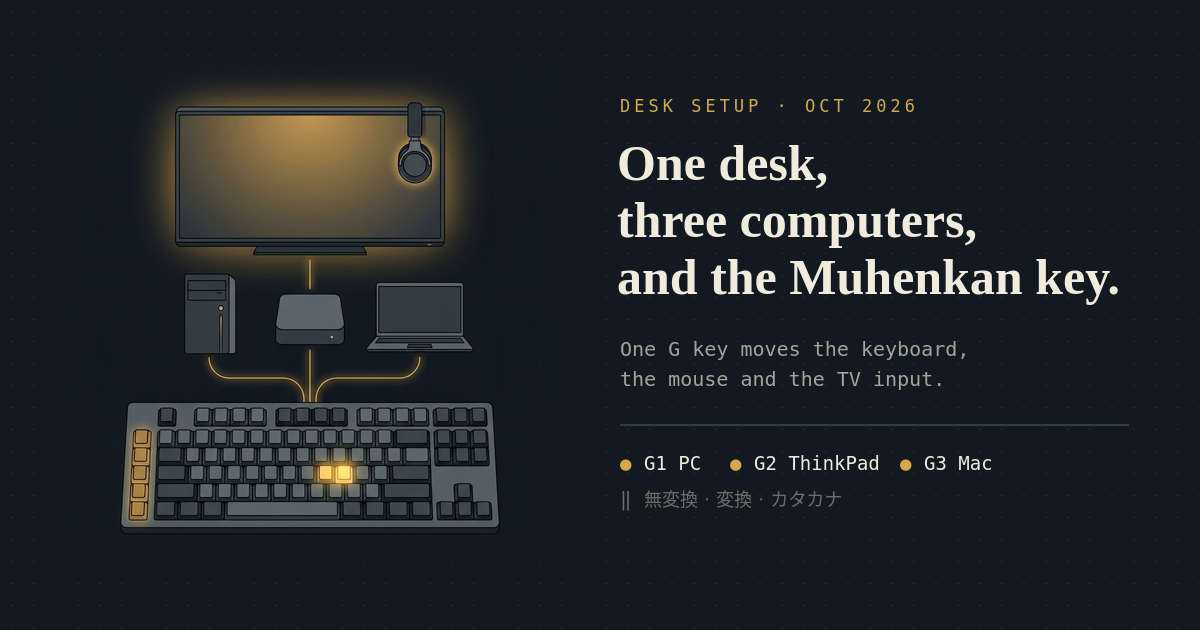
My desk has one keyboard, one trackball, one screen and three computers: the CachyOS desktop, a Mac mini and the ThinkPad. The screen is an LG CX, and every computer has its own HDMI input on it. Until yesterday, switching machines meant the TV remote, then working out which machine the keyboard was on, then which one the headphones were on.
Now it is one button.
One button per machine
The keyboard is a Logitech G913, which has five macro keys down its left side that
do absolutely nothing on Linux. Solaar fixes
that: with divert-gkeys on, the G keys report to Solaar instead of the keyboard
firmware, and a small rules.yaml maps them to commands.
| Key | Goes to |
|---|---|
| G1 | the desktop |
| G2 | the ThinkPad |
| G3 | the Mac |
| G4 | the HP laptop (screen only) |
| G5 | the TV menu |
Each key runs one script, kvm-switch, which does two things in order. First it
moves the keyboard and mouse to the target machine through Synergy. Then it calls
the TV script and switches the LG CX to that machine’s HDMI input. Press G3, and
the Mac is on the screen with the keyboard and trackball already driving it. Press
G1, and you are back on the desktop.
The TV part is a Python script talking to the TV over webOS. It borrows the Mac mini’s existing pairing key over ssh once and keeps a copy, so it works while the Mac sleeps. It finds inputs by the labels set on the TV, so moving a cable means renaming a port, not editing code.
The two halves share a lock. A quick G3 then G1 runs one after the other, so the screen can never end up on one machine and the keyboard on another. If the keyboard switch fails, the screen goes back to the desktop with it. The screen follows the keyboard, always.
Synergy on Wayland, the hard way
This only works at all because xdg-desktop-portal-hyprland gained InputCapture in July. Before that, Hyprland simply could not host a Synergy server. Even now it has opinions.
Synergy has no command for “switch to screen X”. You get there by pushing the
pointer through a linked screen edge, because on Wayland the capture barrier only
exists on linked edges. A hotkey can switch screens, but the target then gets no
input at all. So the server config links only the bottom 1% of the desktop’s
right edge to the Mac, about 14 pixels in the corner where my cursor never
goes, and the left edge’s bottom 1% to the ThinkPad. A small daemon,
kvm-switchd, keeps a virtual pointer alive from login. When G3 asks for the Mac,
it drives that pointer through the corner and only reports success once Synergy’s
log confirms the switch.
Coming back is a single key, Pause, on purpose. My first return hotkey was Ctrl+Alt+Shift+F12. The modifiers reached the Mac before the hotkey fired, and their key releases went to the desktop, so the Mac was left holding Ctrl. Every click became a right-click and every letter became a shortcut. F13–F24 were not an option either: in this keymap they are XF86 keysyms, and Synergy reads them as such.
There were more traps:
- Synergy ignores input devices created after it starts. So the daemon’s virtual devices exist from login, and restarting the daemon restarts Synergy.
- Moving the keyboard receiver breaks the capture session. I moved the receivers from the dock to the desktop, the receiver re-enumerated about ten times, and the next G3 sent the Mac my mouse but not my keyboard. The desktop stayed captured, so it was dead too. The daemon now watches udev for new keyboards and mice and restarts Synergy after them, and if a return to the desktop does not register within 1.5 seconds, it restarts Synergy anyway.
- One scroll-ring click scrolled the Mac 39 to 51 lines, about sixteen times
Synergy’s usual three. macOS’s scroll speed setting does not apply to injected
events, and Synergy has no option for it. A small Swift event tap on the Mac,
synergy-mac-fix, divides Synergy’s scroll events by 16 and leaves every other device alone.
The Muhenkan key
I type English, Japanese and Turkish every day, and my switching is muscle memory from an old Karabiner setup on the Mac: Muhenkan (無変換) for English, Henkan (変換) for Japanese, the Katakana key for Turkish. When I moved to Hyprland, those became three fcitx5 bindings. Through Synergy, they fell apart.
Karabiner never sees Synergy’s keys, because they arrive as injected events. The
Synergy Mac client maps Henkan to the JIS かな key and Zenkaku to 英数, and drops
Muhenkan and Katakana completely. So the server config now sends F15 for
Muhenkan and F16 for Katakana, the highest F-keys the Mac client still maps,
and synergy-mac-fix swallows F15, F16 and かな and selects ABC, Turkish and
Japanese by ID. Selecting by ID also skips macOS’s double-press behaviour on the
native keys, and the auto-repeat burst Synergy sends for a held key.
The ThinkPad got its own surprise. Synergy’s hotkeys are global, so Muhenkan pressed on the ThinkPad arrives there as F15. Synergy sends those with keycode 0, which waynergy typed as some bogus key that opened the Omarchy system menu and started media playback. An id-keymap entry in waynergy’s config fixed that.
Turkish letters, and the crash
Selecting Turkish on the Mac turned out to be the easy part. Synergy’s Mac client
types the characters produced by the desktop’s keymap, and while Synergy holds
the keyboard, that keymap is Hyprland’s jp. With Turkish selected on the Mac,
the I, @ and [ keys still typed i@[.
Switching the xkb group on the desktop did not help: Hyprland only passes group
changes to InputCapture with an extra option, and Synergy ignores those events
anyway. So the next version switched the desktop’s layout from the Mac’s
keys. The Mac logged the Katakana press, kvm-switchd followed that log over
ssh, came back to the desktop, switched the layout to Turkish and pushed through
to the Mac again, so Synergy captured the new keymap.
That got Turkish letters onto the Mac. Twenty-six minutes after I committed it,
Hyprland aborted with heap corruption in CInputCaptureProtocol::clearBarriers,
took the whole session with it, and the portal segfaulted on the way out.
Changing the compositor’s keymap at runtime, around a live input-capture session,
is not something Hyprland survives.
I pulled it the same evening. Now the input-method keys pressed on the Mac are only remembered, and the desktop applies them when I come back with G1. Turkish letters on the Mac are an open problem again. I have a theory about fcitx5’s virtual keyboard and the capture’s keymap, but I am going to test it on a morning when I can afford to lose the session.
The crash also left one rule behind, which caught one more bug this morning: nothing on the desktop may change the keymap while Synergy is away. Hyprland’s bindings still fire on the desktop while Synergy forwards the keyboard elsewhere, so pressing Muhenkan on the ThinkPad also switched the desktop’s fcitx5. Its keymap changed mid-capture, and the keyboard disappeared from the ThinkPad. Every input-method binding now goes through a small wrapper that does nothing unless Synergy is on the desktop.
Clipboard, and audio from anywhere
Synergy can share the clipboard, but not on this desktop: Hyprland’s portal has no
clipboard support, so Synergy cannot read or write it. The daemon does it over ssh
instead. When G3 or G2 lands, it copies the desktop’s clipboard to the Mac
(pbcopy) or the ThinkPad (wl-copy), and on G1 it brings that machine’s
clipboard back. It skips anything a password manager marks as secret and anything
over 1 MiB, and Japanese and Turkish text survive the trip both ways. The brief for
this post was written on the desktop and pasted on the ThinkPad.
Audio went the other way round. The MOTU UltraLite and the
Audeze Maxwell’s dongle now live
on the Mac, and the desktop streams to them over the LAN with
Roc: a PipeWire Roc sink on the desktop, a roc-vad
receiver on the Mac, and sox playing that into the MOTU or the Maxwell. The
ThinkPad has the same
two sinks. The G913’s M1–M3 keys move the desktop’s audio between the MOTU, the
Maxwell and the TV’s speakers, and take everything that is already playing with
them.
Getting it clean took some tuning:
- The first version sounded garbled. 50 ms of latency and a small buffer were not enough. 200 ms, a better resampler and 48 kHz end to end fixed it. That is fine for video and music, not for twitchy games.
- The MOTU was running at 192 kHz while the stream was 48 kHz, so
soxlogged a buffer overrun about one and a half times a second. Setting the MOTU to 48 kHz stopped them. - The Maxwell garbled anyway. With a 4096-sample sox buffer it overran about six times a second, with 8192 about twice. With 16384, none in 75 seconds. Most likely clock drift between the Roc receiver and the headset’s dongle.
- Then it died with nothing wrong in the pipeline. The Mac’s load average was
342: a VM, six Godot runs, an Xcode build and an iOS simulator. The Roc receivers
live in
coreaudiod, and they starve. The passthroughs now run with interactive scheduling, and a watchdog restarts one that starts logging overruns.
Right now, I am watching a YouTube video playing on the desktop, working on the ThinkPad, and listening through the headphones on the Mac. Three machines, one desk, and none of them need me to stand up.
Was it worth a day?
It was a day and a morning, and it was mostly Claude writing and Codex reviewing, with me pressing G keys and reporting what broke. Most of the fixes above started as a failure at the desk.
The time I lose switching machines is not the seconds of pressing buttons. It is reaching for the remote, finding the right receiver, checking where the sound went, and losing the thought I was in the middle of. That is gone now. I press a key, the screen and the keyboard and the clipboard follow, and the music keeps playing wherever I left it.
Turkish on the Mac can wait. I will just type ş on the ThinkPad.
related entriesshared tags