Resurrecting the Star Trek Grand Timeline in Plex: A Migration Story
The story of how we preserved a meticulously curated Star Trek timeline and successfully migrated it into a seamless Plex playlist.

For any dedicated Star Trek fan, watching the series in chronological “Grand Timeline” order can be a transcendent experience. However, managing nearly a thousand episodes and movies across a dozen different series poses a significant technical challenge—especially when moving to a modern media server like Plex.
Here is the story of how we preserved a meticulously curated Star Trek timeline and successfully migrated it into a seamless Plex playlist.
The Original Issue & File Structure
Our journey began with an incredibly detailed, human-curated file structure. Every single episode and movie had been carefully named to reflect its absolute chronological viewing order, using a rigid and highly specific convention:
[Absolute Order] - [Air Date] - [Show ID] [Sxx] [Eyy] - [Title].mkv
For instance, an episode would look like this:
396 - 1994-05-23 - TNG S07E25-26 - All Good Things....mkv
This file naming convention was brilliant for viewing sequentially on a computer file browser. However…
Why This Was a Problem
When we attempted to bring these files into Plex, the system revolted. Plex relies heavily on standard media naming conventions matching databases like TVDB or TMDB (e.g., Show Name/Season 01/Show Name - S01E01.mkv).
Because of the prepended [Absolute Order] and [Air Date] tags in the filenames, Plex failed to correctly identify the series, pull the right metadata, or group the episodes. The immediate reaction might be to embed custom metadata tags directly into the MKV files. But this also fails: Plex is notoriously stubborn and actively ignores almost all custom embedded MKV tags when it comes to timeline or playlist generation.
We had to appease the Plex scanner so we could get all the rich metadata, posters, and summaries, but throwing away that level of meticulous, neurotic data-entry would be a crime against the digital archives.
To solve this, we devised a three-step plan.
The 3-Step Plan
1. The Preservation (The CSV Ledger)
Before changing a single filename, we had to extract the timeline into an immutable source of truth: a standard CSV file. We built a script equipped with regular expressions to parse the rigid filenames.
- The Regex:
^(\d+)\s+-\s+[\d-]+\s+-\s+([A-Z0-9]+)\s+(S\d+)\s?(E[\d-]+) - Example Output:
Order, Show, Season, Episode->396, TNG, 07, 22
This CSV (stardate_order.csv) became our permanent ledger.
2. The Great Renaming (The Purge)
Now that the timeline viewing order was safely backed up, we could mercilessly butcher the filenames to appease the Plex scanner. Using automated scripts mapping the files, we moved everything into a strict Plex hierarchy:
.../Star Trek The Next Generation/Season 07/Star Trek The Next Generation - S07E22.mkv
With the standard names in place, Plex happily scanned the library, recognized the files, and pulled in all the beautiful TVDB metadata and artwork.
3. The Resurrection (Automating the Playlist)
Once Plex had digested the newly structured library, we used our CSV ledger to rebuild the timeline as a Plex playlist. Doing this manually for almost a thousand items was out of the question.
Using the Python-PlexAPI library, we wrote a script that effectively:
- Authenticated to the local Plex server via API token.
- Created a new empty playlist called “Star Trek: The Grand Timeline”.
- Iterated through the
stardate_order.csvline by line. - Queried the Plex library dynamically for each row (e.g., Find Show “Star Trek The Next Generation”, Season 7, Episode 22).
- Appended the retrieved media object directly to the playlist.
Execution
The execution proceeded smoothly through a combination of Python automation scripts. The first script chewed through the massive directory, logging every file perfectly to the CSV format. The second phase systematically transformed over 900 custom-named episodes into a pristine Plex structure, organizing the files by series and season folders.
Once that was finished, Plex updated its databases. We then ran the PlexAPI script. We handled a few special edge cases—like mapping “TOS” simply to “Star Trek” internally on Plex, and configuring search rules for movies. But ultimately, we watched the terminal output with satisfaction as every episode sequentially locked into place:
[1] Found Episode: Star Trek Enterprise S01E01
[2] Found Episode: Star Trek Enterprise S01E03
...
[783] Found Movie: Star Trek: Nemesis
...
[794] Found Episode: Star Trek Lower Decks S02E01
Final Outcome
We successfully preserved the custom timeline of the digital archive without sacrificing the beauty and functionality of a modern media server. The final script built a stunning, unified playlist spanning the entire Star Trek universe in exactly the intended order.
Here is the final result in action:
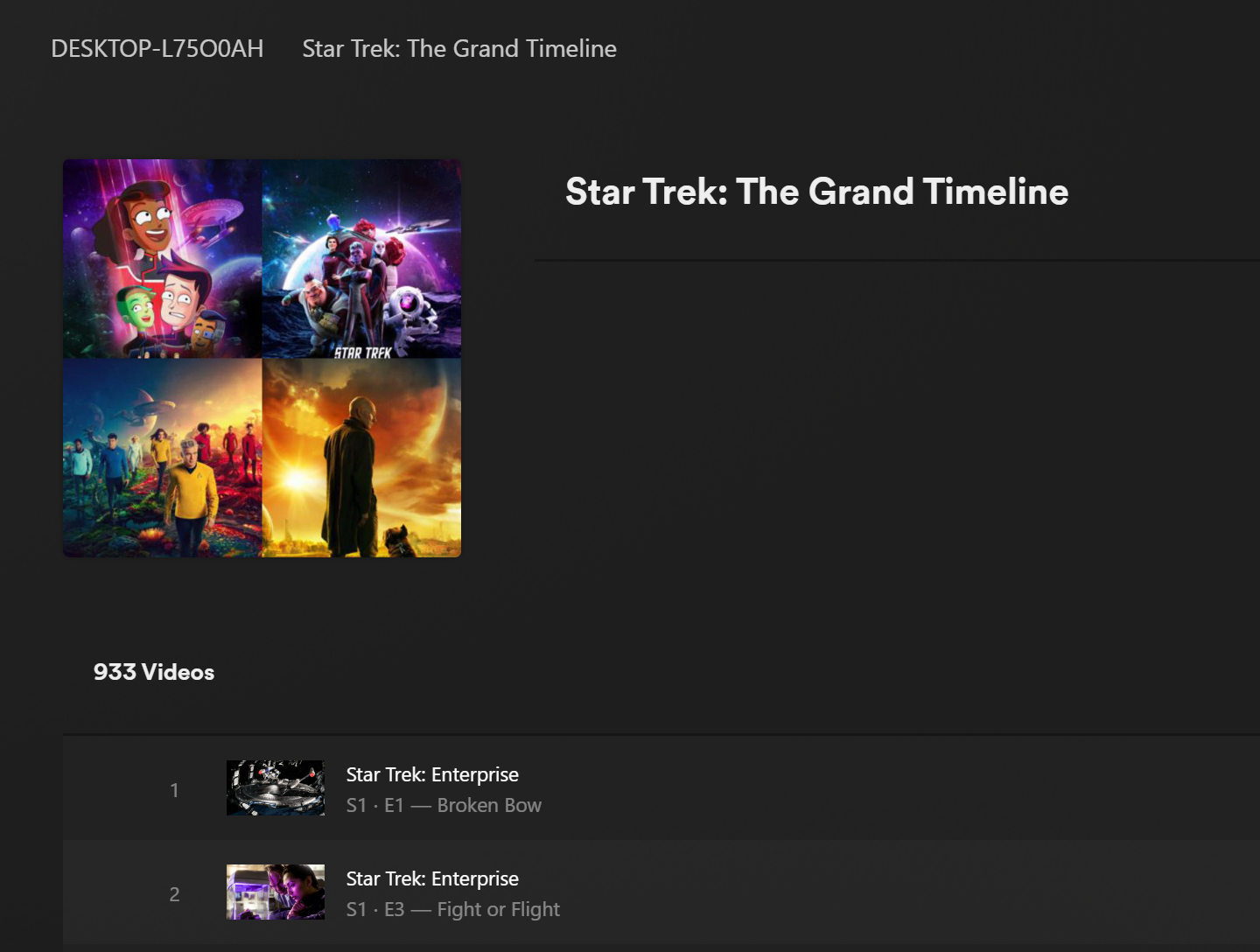
Now, we simply hit “Play” on episode 1 and let the grand voyage unfold. Engage! ps: for the curious minds, it will take 29 days to watch all of this playlist.