Vigil Today, three months in: inventory tracking and an MCP server
An update on Vigil.Today — recurring reminders now decrement physical inventory, the widget hides far-future tasks behind a drawer, and an MCP server lets ChatGPT and Claude read and write your data.

In February I wrote about Vigil.Today, a small PWA I built for the kind of recurring chores that are too small for a calendar but too easy to forget. Three months later it has grown into something I actually open every day, and a handful of the changes I made along the way are worth writing up.
The headlines: reminders can now decrement physical inventory, the widget hides the long tail of “due in 800 days” filter changes behind a drawer, and there is an MCP server so I can drive all of this from ChatGPT or Claude.
What changed at a glance
| Feature | What it does |
|---|---|
| Inventory tracking | Each item has a quantity, a reorder threshold, and a per-event history |
| Multiple items per reminder | One tap on “change range hood filters” can decrement the inner and outer filters in one shot |
| ”X later” drawer | Reminders due more than a week out collapse into a drawer so the widget stays compact |
| Sort by urgency | Active cards now sort overdue → urgent → safe → done, so what matters reads first |
MCP server at mcp.vigil.today | OAuth-protected MCP endpoint. ChatGPT, Claude and any other MCP client can read and write your reminders and inventory |
| Promo videos | A short 60s walkthrough on the landing page, in seven languages |
The new promo video is the fastest way to see what the app looks like now:
Inventory tracking
About half the reminders I had set up in Vigil were “replace X”. Refrigerator filter every six months, range hood filters every year, futon roughly every twelve. The chore is usually two steps: take the old one out, install the new one. But “install the new one” assumes you have a new one. The first time I tapped “change refrigerator filter” only to discover the spare I thought I had was actually the used one I had never thrown out, I knew the model was broken.
So Vigil now has an inventory tab. Each item gets:
- A name, icon, and unit label (
filter,capsule,bag). - Quantity on hand.
- A package quantity, so tapping ”+ Add pack” bumps stock by the right amount instead of you doing the math.
- A reorder threshold. When on-hand drops to or below it, the item gets a “low stock” badge and the user gets a one-shot push.
- An optional product URL so I can jump straight to the reorder page.
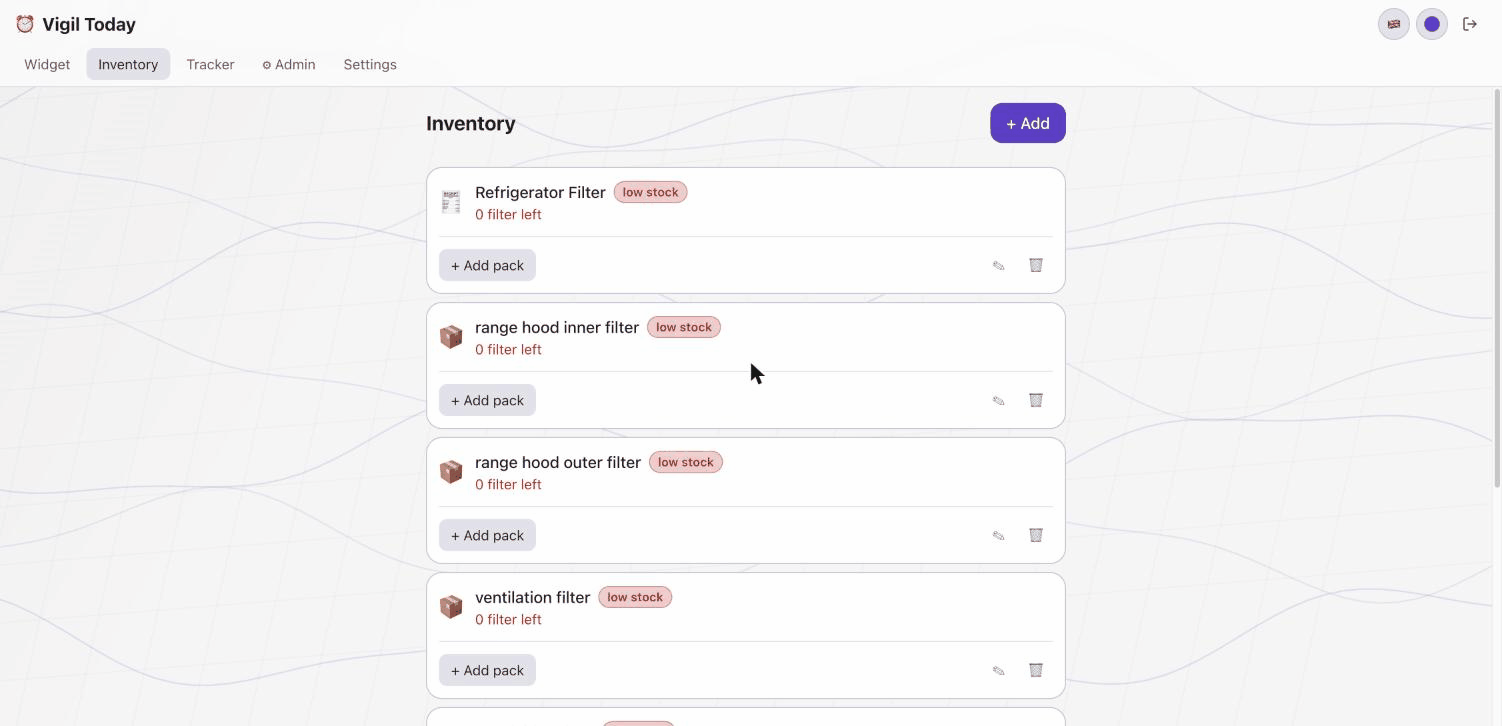
Inventory items keep a per-event audit log too — purchases, uses, low-stock alerts, all of it — so I can see how fast I am actually going through coffee filters versus how fast I thought I was. That alone changed how I shop.
One tap, many items
Some reminders touch more than one item. A single “change range hood filters” task is really two physical items: the inner mesh filter and the outer carbon filter. In the first version, a reminder could link to one inventory item. Now it links to an array (linkedInventoryItemIds). Tap once, both decrement, both write a row to history.
The old single-link field is kept on the schema as a deprecated mirror of the first id so older documents and queries don’t break. That kind of small bridge is unglamorous, but it saved me from a data migration on day one of the rollout.
The drawer for the far future
The widget view in the first version was a flat grid sorted by creation date. That was fine when I had six reminders. It started feeling cluttered around fifteen — particularly because most of my new reminders were “replace the humidifier filter every 2 years”-style entries. Those are real, but they should not compete for attention with “take supplements”, which is due today.
Two small changes fixed it:
- Sort by urgency. Overdue and urgent now bubble to the top; “done for today” cards fall to the right; creation order is only the tie-breaker.
- Hide the long tail. Anything due more than seven days out drops into a “N later” drawer at the bottom, collapsed by default. Tap to expand.
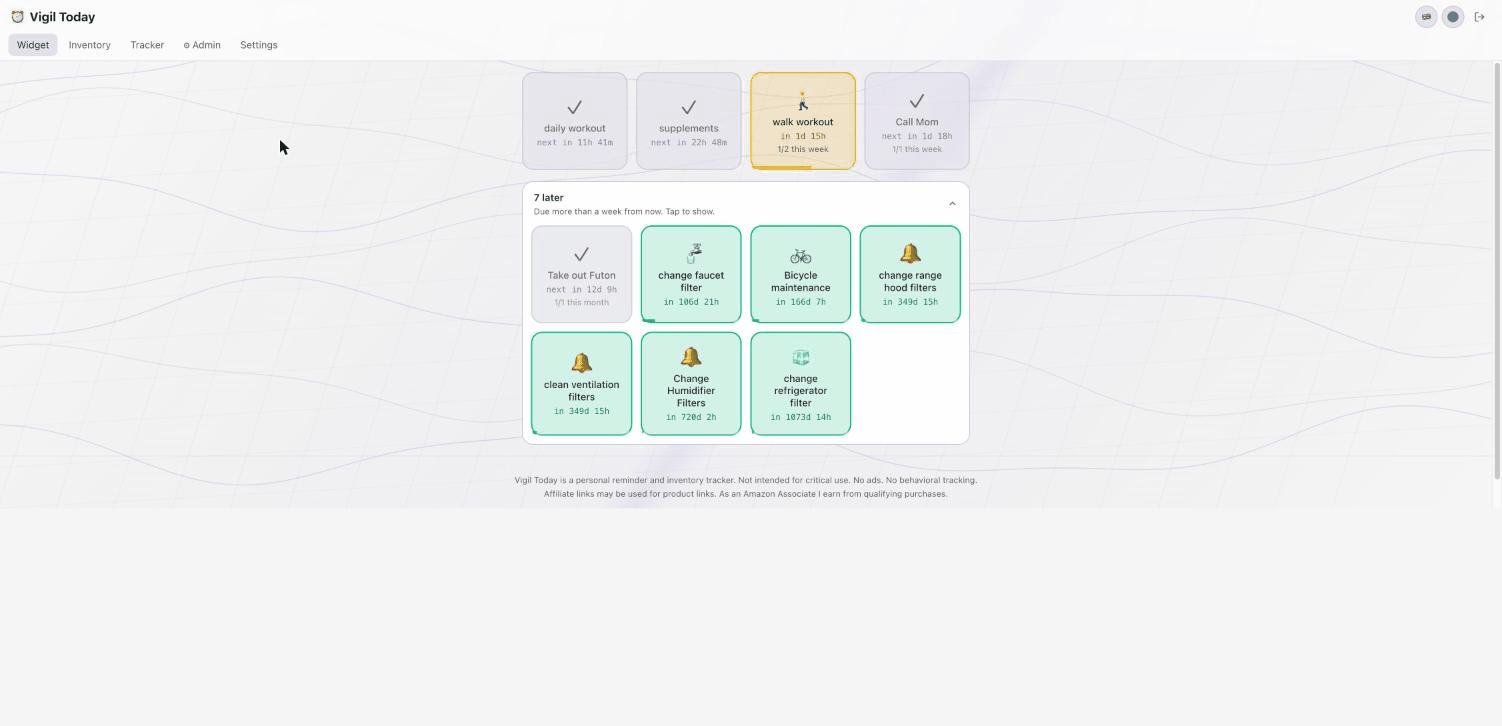
The result is a widget I can look at for two seconds and immediately know what needs my attention. Everything else is still one tap away.
An MCP server
This is the part I’m most happy about, and the part that took the most yak-shaving to ship.
Vigil now exposes a Model Context Protocol server at mcp.vigil.today. If you haven’t run into MCP yet: it’s the standard that ChatGPT, Claude, Cursor and a growing list of clients use to talk to external services. You authenticate once via OAuth, the client picks up a set of “tools”, and from then on the chatbot can call them on your behalf.
For Vigil that meant twelve tools across two scopes:
- Read tools for reminders, inventory, completions, today’s plan, low-stock items, item history.
- Write tools for creating and updating reminders and inventory items, marking a reminder complete, recording a purchase, and decrementing one unit of an inventory item.
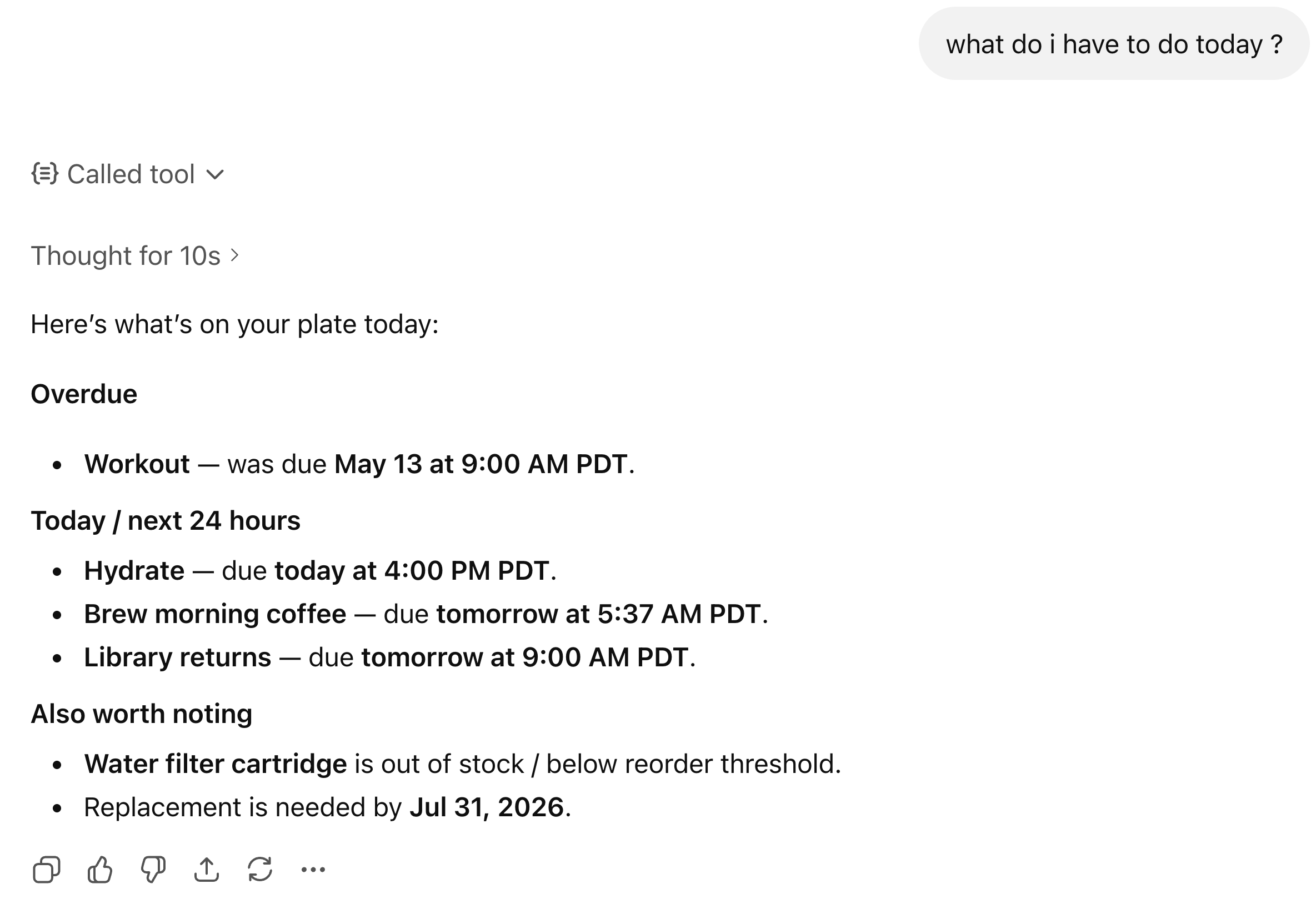
In practice, the conversation looks like this. “What’s on my plate today?” pulls today’s reminders sorted by urgency, with timing context:
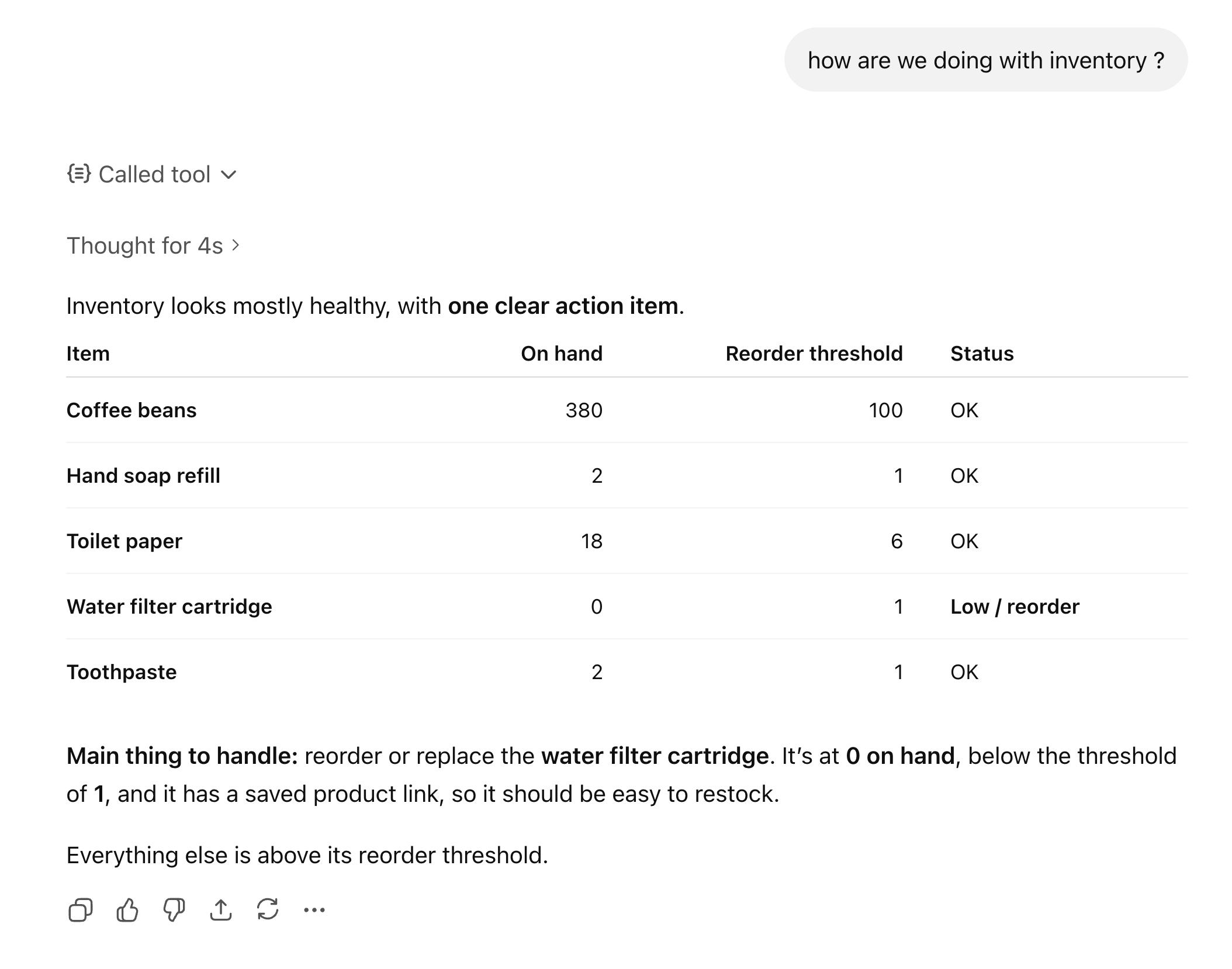
“How am I doing on supplies?” returns inventory in stock order, flagging the low ones:
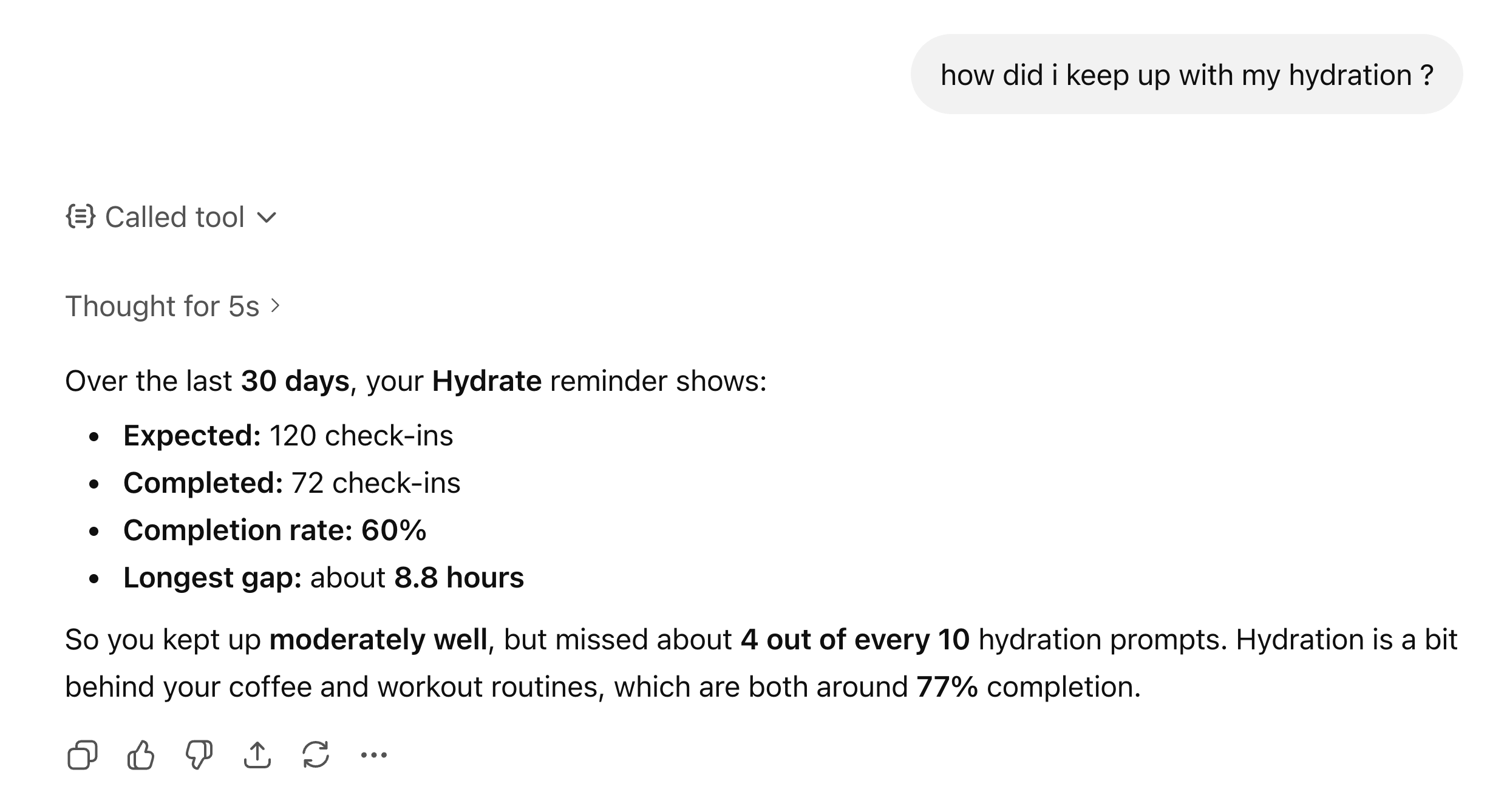
“Log my hydration” causes the chatbot to call the right markComplete tool with the right reminder id, decrement the linked inventory item by one, and report back:
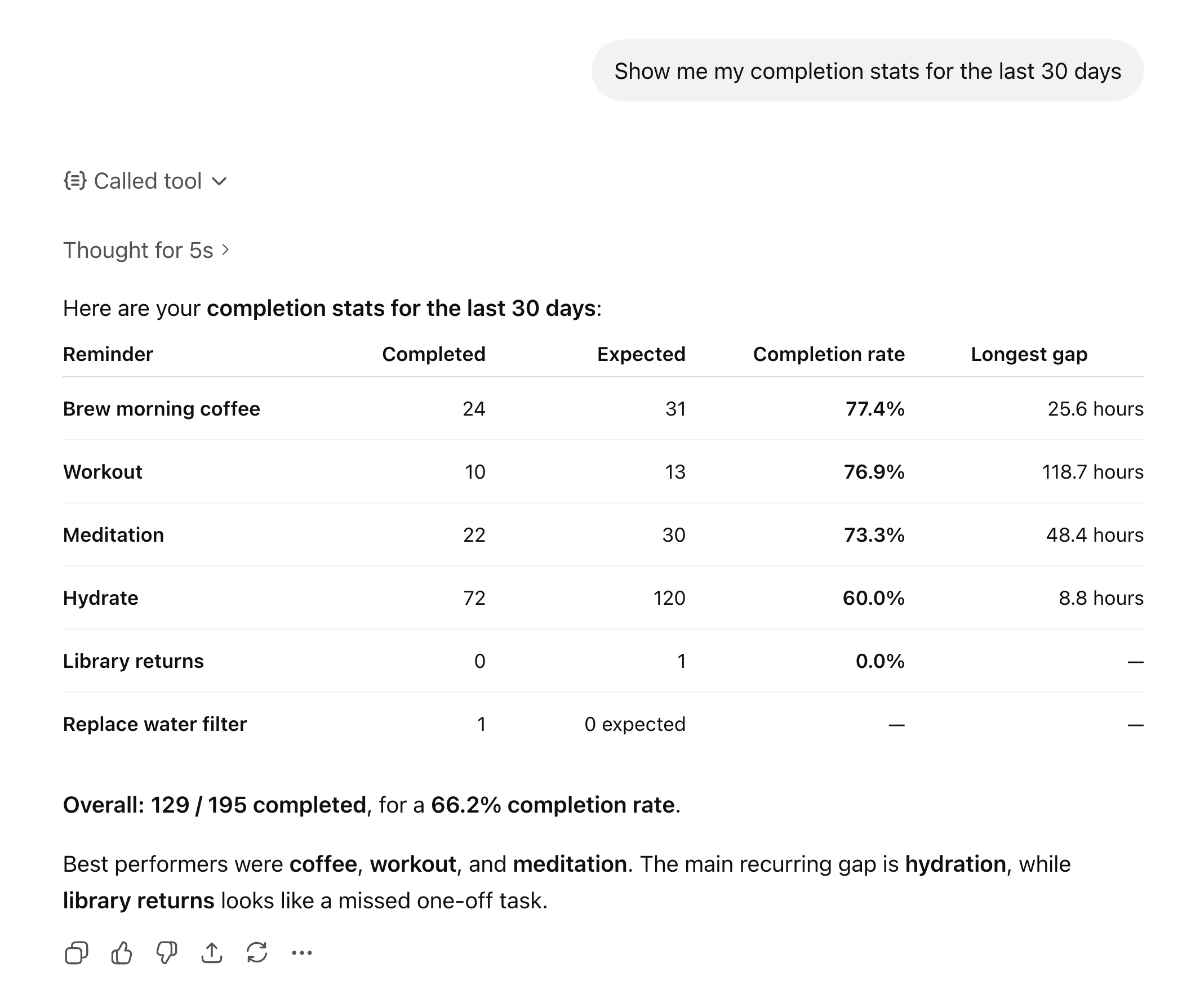
And for the longer-arc questions (“how consistent has my workout been this month?”) it can pull completion stats and reason about them in plain English:
What I did not expect was how much friction this removes. The PWA is already fast, but the moment you have to type into a reminder form is the moment you stop logging things at all. Saying “I just took my morning meds” into a chatbot and having it dispatched to the correct reminder is materially nicer than tapping through a UI.
How the MCP server is built
A few notes for anyone trying to do the same thing:
- The server runs on Cloud Run behind
mcp.vigil.today, separate from the SvelteKit SPA. It uses the Firebase Admin SDK to verify Firebase ID tokens and reads/writes the same Firestore the app uses. - OAuth flows use Dynamic Client Registration (RFC 7591) so MCP clients can self-register. Without DCR you would be hand-issuing client IDs to every chatbot vendor, which does not scale.
- Auth codes, access tokens, refresh tokens, registered clients and rate-limit windows all live in Firestore with
expiresAtfields plus Firestore TTL policies doing the cleanup. Without TTL, expired docs accumulate forever. - “Sensitive” inventory items (medications, for example) are gated by a per-user
allowMcpSensitiveAccessflag. By default the chatbot cannot see them at all. I would rather build that fence on day one than retrofit it later.
If you want to try it: head over to the AI connector page once you have an account, and follow the instructions for ChatGPT, Claude, or any other MCP client.
Other small wins
A few smaller things worth mentioning:
- 7 Dracula Pro variants. Themes are now the Dracula Pro family — Blade, Alucard, Buffy, Lincoln, Morbius, Van Helsing, plus the original. I have an ongoing love affair with that palette.
- 7 languages. English, Turkish, Japanese, German, French, Spanish, Portuguese, with localized promo videos to match.
- Server time sync.
markCompletenow estimates server time via a callable function and uses one timestamp for bothlastCompletedAtandnextDueAt, so devices with skewed clocks don’t accidentally complete reminders five minutes early. Offset is cached for 5 minutes and re-checked when the tab wakes from a long sleep. - Rate-limited callables. Server-side per-user cooldowns on
getServerNow(10s) andsendTestNotification(30s) keep the abuse surface small.
How this is paid for
The deal is the simplest one I could land on:
- The web app is free, and stays free. Reminders, inventory, completion tracker, push notifications, themes, languages — all of it works on the free tier with no usage caps.
- The MCP connection is the paid tier. Running an OAuth-authenticated Cloud Run service and keeping the Firestore TTL machinery humming costs me real money, and the people who want a chatbot driving their reminder app are exactly the people I would most like to find a proper subscription with. If you read this far, use coupon code
BLOG100at checkout for 100% off. No expiry, no fine print. Consider it a thank-you for reading. - Amazon affiliate links. When you set a
productUrlon an inventory item that points atamazon.comoramazon.co.jp, the app rewrites it into an affiliate link and I earn a commission when you reorder through it. That is the entire ad strategy. No banners, no tracking pixels, no third-party scripts, no behavioral analytics. None of those are coming, now or later.
That’s the contract. Pay me if you find the MCP genuinely useful, or don’t and use the free tier forever — either is fine.
Where it goes next
The next thing on my list is finishing real billing for sensitive features — the Polar integration went live for a small subset of users a couple of weeks ago — and a few more MCP tools. Particularly: creating inventory items from chat, and a “what should I reorder this week” summary that reasons across lead times.
This project sits alongside a few other small tools I’ve been shipping — Skriv.ist for ebooks and Slop Machine for AI-generated stories. The thread is the same: build the thing you want to use yourself, ship it, then keep showing up to it.